reqx
Your requirements. Your repositories.
Create, trace, and baseline requirements in a browser, while every requirement lives as a plain, readable file in Git repositories you control. Engineers, systems leads, and quality staff work in the same application without needing Git or the command line.
Your data
One requirement, one file, in Git
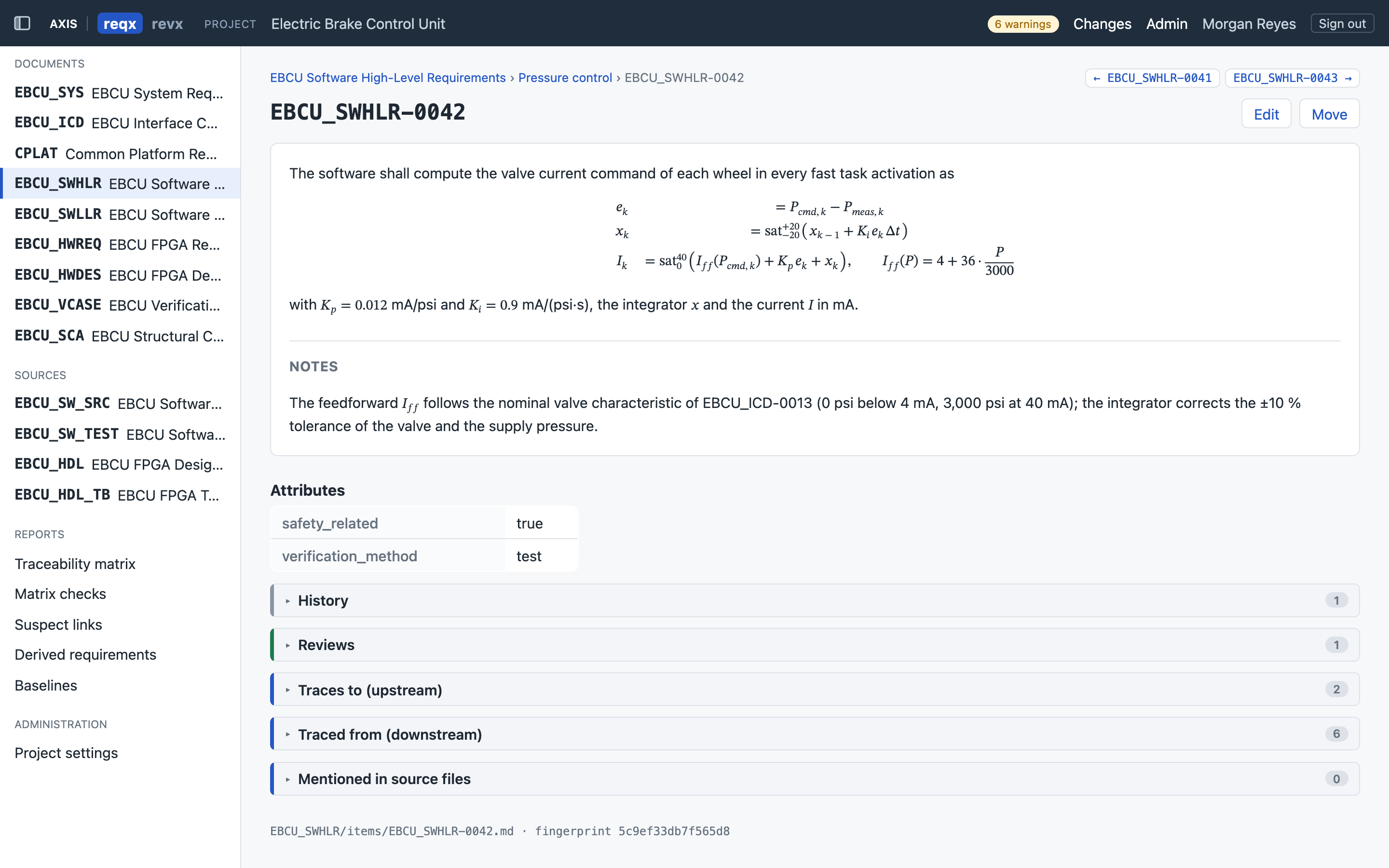
Every requirement is a Markdown file with YAML front matter: ID, outline position, derived flag and rationale, custom attributes, and traces. Each document is its own Git repository, and a project groups documents and sources and defines which may trace to which.
- Works with GitHub, GitLab, or a self-hosted Git server
- Published, versioned file format with canonical, deterministic output, so files diff cleanly
- Rich content: headings, tables, code blocks, images, and TeX equations
- Custom attributes per document, with types, choice lists, and required fields
- A document can be shared by several projects
---
id: EBCU_SWHLR-0061
kind: requirement
parent: EBCU_SWHLR-0058
order: l
links:
  - target: EBCU_ICD:EBCU_ICD-0018
    fingerprint: a8a81f30c017dd7e
  - target: EBCU_SYS:EBCU_SYS-0031
    fingerprint: 4424c7fad832c4bf
attributes:
  safety_related: false
  verification_method: test
---
When landing gear up selected changes from not
indicated to indicated while weight on wheels is
indicated on neither side, the software shall
activate gear retraction braking, commanding
250 psi to all four wheels, for 4 s.
Browser editing
An editor the whole team can use
Document views with outline numbering, search, and filters; an item editor with live preview; drag-and-drop reordering; and bulk edits across selected rows.
Safe concurrent editing
Items are locked while edited and IDs are reserved on creation. Concurrent changes merge field by field; real conflicts are shown side by side to resolve.
Pending changes and commit
Each user sees their own uncommitted changes with diffs, then commits all or a selection. Commits are validated first and refused if they would introduce new errors.
Item history
Every version of a requirement is available, with a diff between any two. Commit messages record who made the change and its change reference.
Traceability
Links that notice when they go stale
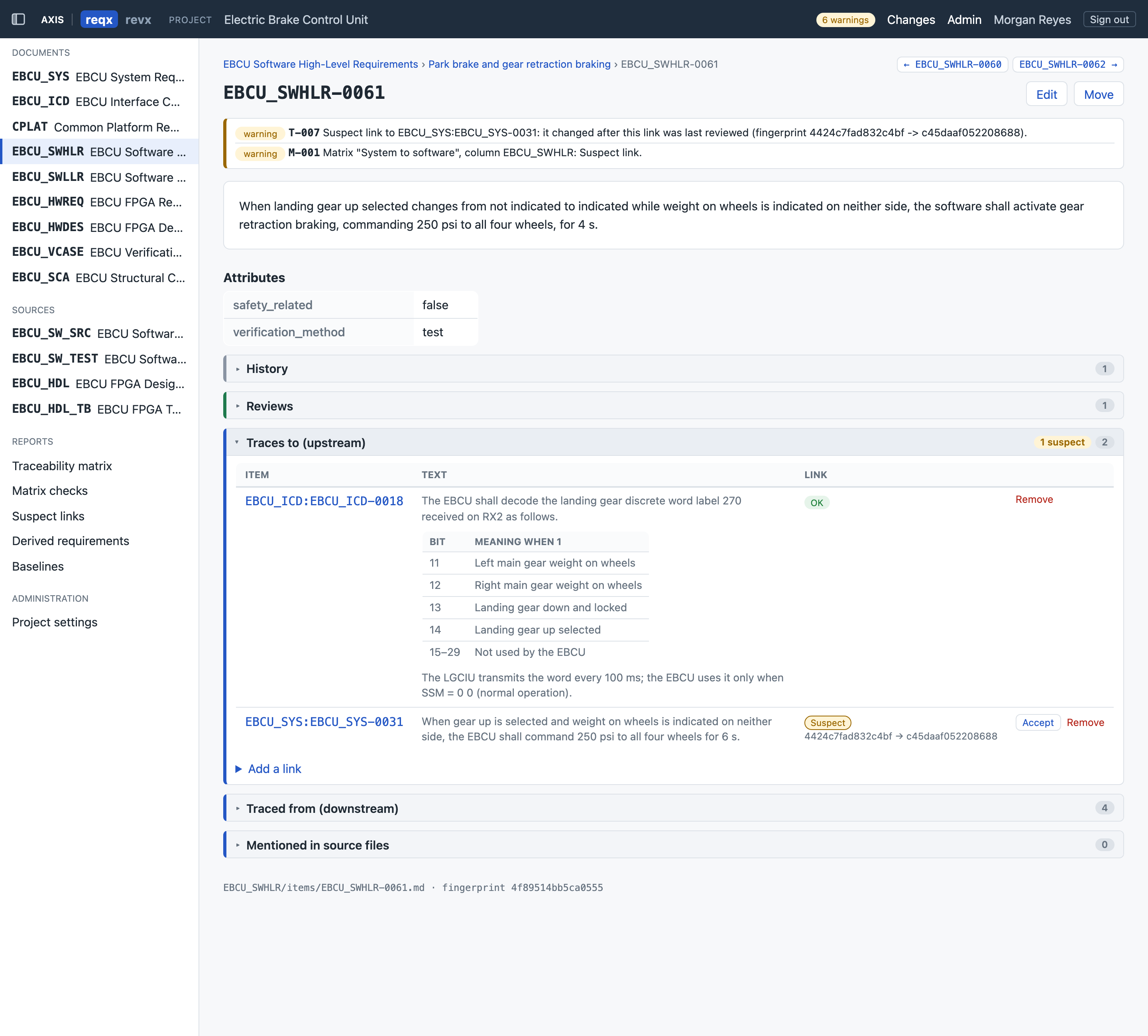
Each link records a fingerprint of the upstream requirement's normative content. Content changes flag every downstream link as suspect until reviewed and accepted.
- See which links a pending change will make suspect, before you commit
- Derived requirements are first-class, with rationale, and reported separately
- Source, test, and analysis repositories are scanned for requirement IDs, so code and test coverage appear in the trace
- Validation rules with stable IDs cover broken links, disallowed traces, cycles, deleted targets, and suspect links
The whole project at a glance
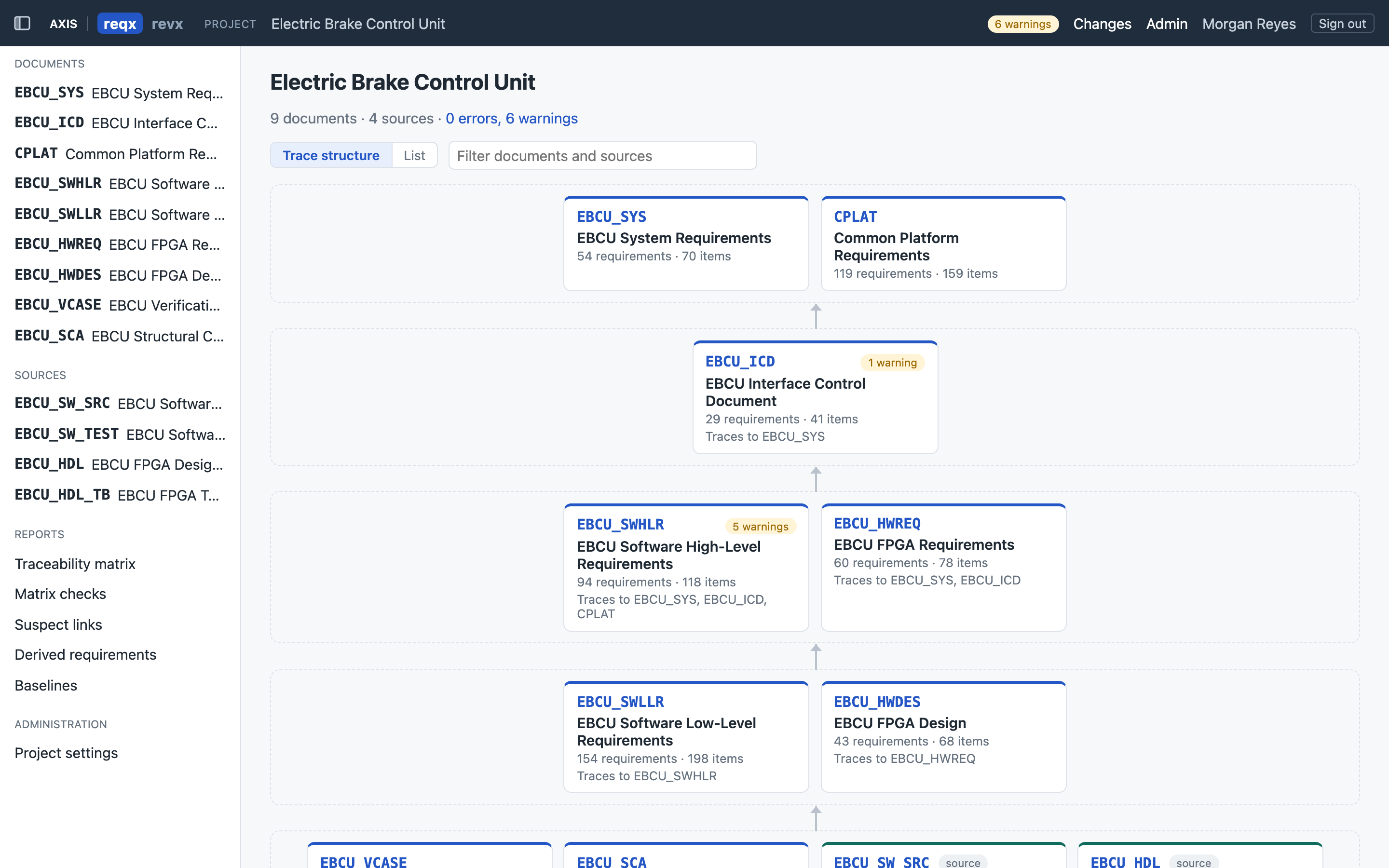
The project page lays out the documents and sources and the directions they may trace, with warnings shown where they occur. Open any document, source, matrix, or report from the same view.
Matrices and reports
Traceability matrices you configure, and CI can check
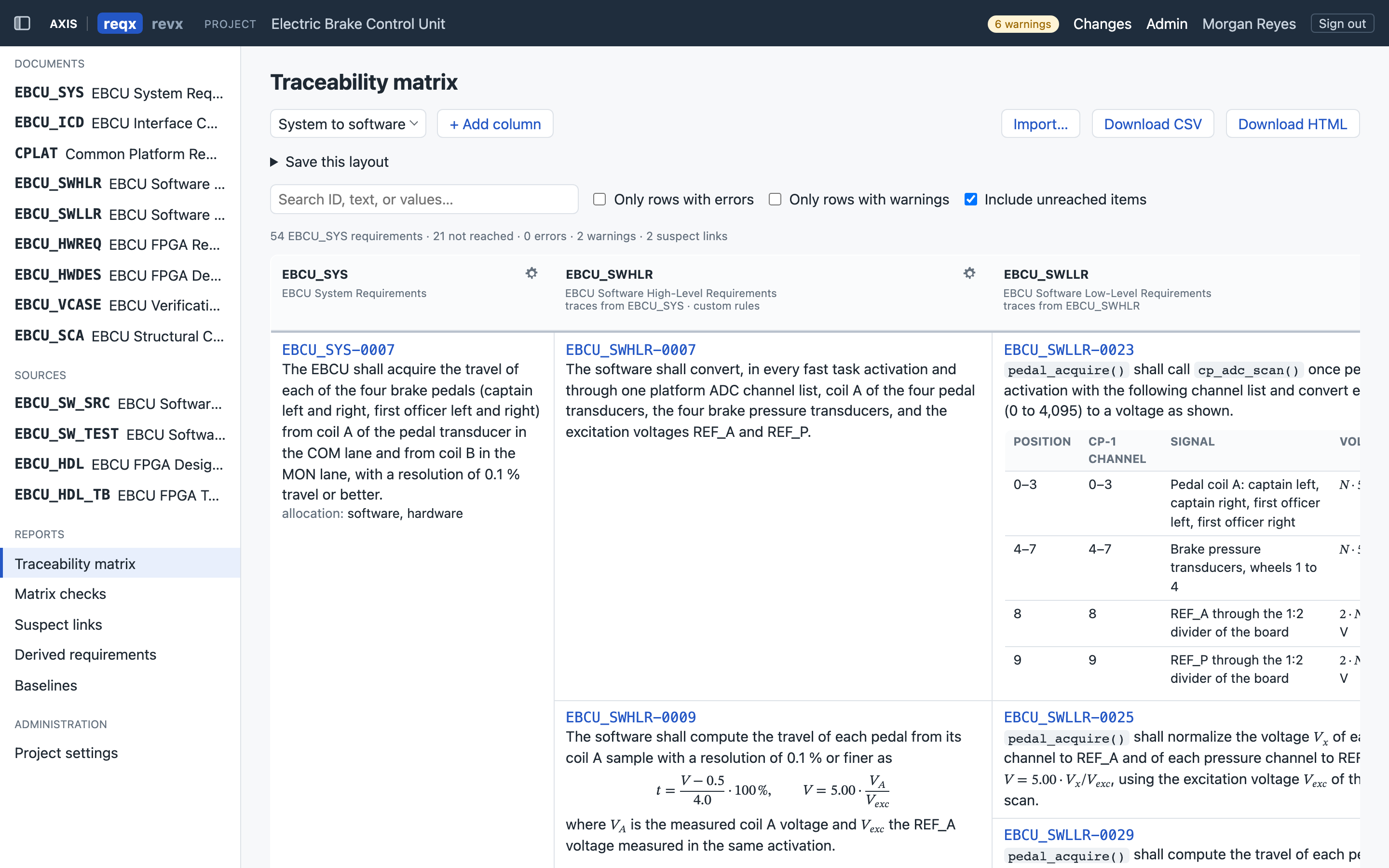
Choose the documents and sources in each column, the fields shown, and what an empty cell means: a gap, not applicable, or fine. Highlight rules flag cells that need attention.
- Save matrix layouts in the project; mark them checked so gaps fail validation in CI
- Show any document at a label or any source at a tag
- Reports for matrix checks, suspect links, and derived requirements as printable HTML or CSV
- Report headers record the exact versions used
Configuration management
Labels, baselines, and change references
Document labels
Tag a document version, such as SRS-1.0, view the document as it was, and compare any two versions.
Project baselines
Pin every document at a label and every source at a tag in one step. View, report, and export at a baseline, and compare baselines.
Change references
Require a problem report or change request on every commit, checked against GitLab, GitHub, or Jira.
Import, export, and integrations
Bring existing data in, and get documents out
Import
- ReqIF (
.reqif,.reqifz) and CSV exported from DOORS, with a DOORS preset - Word (
.docx) and general CSV - Outline, rich text, tables, pictures, attributes, and links, with reusable mappings
- Re-import with a three-way merge and a preview before anything is written
Export
- Documents as HTML, PDF, and Word, using your company template
- Title page, contents, and every requirement with its attributes and traces
- Reports as HTML and CSV
Integrations
- GitLab Issues, GitHub Issues, and Jira Cloud and Data Center
- Signed, retried webhooks
- REST API with scoped, expiring tokens
- Command-line tool to validate, report, import, and export in CI
DOORS data is imported from ReqIF or CSV exports. reqx does not maintain a live connection to DOORS.
Administration and deployment
Self-hosted, with security built in
reqx runs on your own infrastructure. Setup happens in the browser: create the first administrator, connect to your Git server, and create documents and projects without a command line.
| Server | Self-hosted: Docker image and Compose file, or Node.js 24 |
|---|---|
| Clients | Current Chrome, Edge, or Firefox on Windows, macOS, or Linux |
| Storage | Your Git repositories, plus a local SQLite database for users, sessions, and pending changes |
| Access control | Built-in accounts with strong password hashing, lockout, and session expiry; viewer, author, project admin, and server admin roles per project and per document |
| Audit | Append-only log of sign-ins, role changes, labels, baselines, imports, and configuration changes |
| Hardening | Strict content security policy, CSRF protection, origin and host checks |
| Availability | Active/passive operation with replication, health endpoint, and backup and restore |
| Licensing | Checked offline from a signed file; no usage reporting. Users with the viewer role do not need author licenses. |
See reqx with your kind of program
We'll walk through a synthetic DO-178C / DO-254 example, from system requirements to code and VHDL. Pricing is available on request.